Last verified
Colorado well permit search, step by step
Search Colorado well permits free in the Division of Water Resources Well Permits tool, by address, permit number, legal description or location. DWR well permits · verified Oct. 2026 No account and no fee.
Open DWR Well Permits search Open the Well Permit Map Viewer
The records are public and hold roughly 650,000 permits statewide, 347,256 in the South Platte division alone. What a record shows you is the permit's status, its permitted use, the aquifer and total depth, the issue and completion dates, and the well's location by legal description.
Two fields decide everything. Status tells you whether the permit is live. Permitted use tells you what you may lawfully do with the water — and on a lot under 35 acres that is very often indoor household use only, with no irrigation at all.
Search by address
The tool searches around an address rather than matching it: you get every permit within a set distance of the point, neighbors included. These steps were checked live on October 16, 2026.
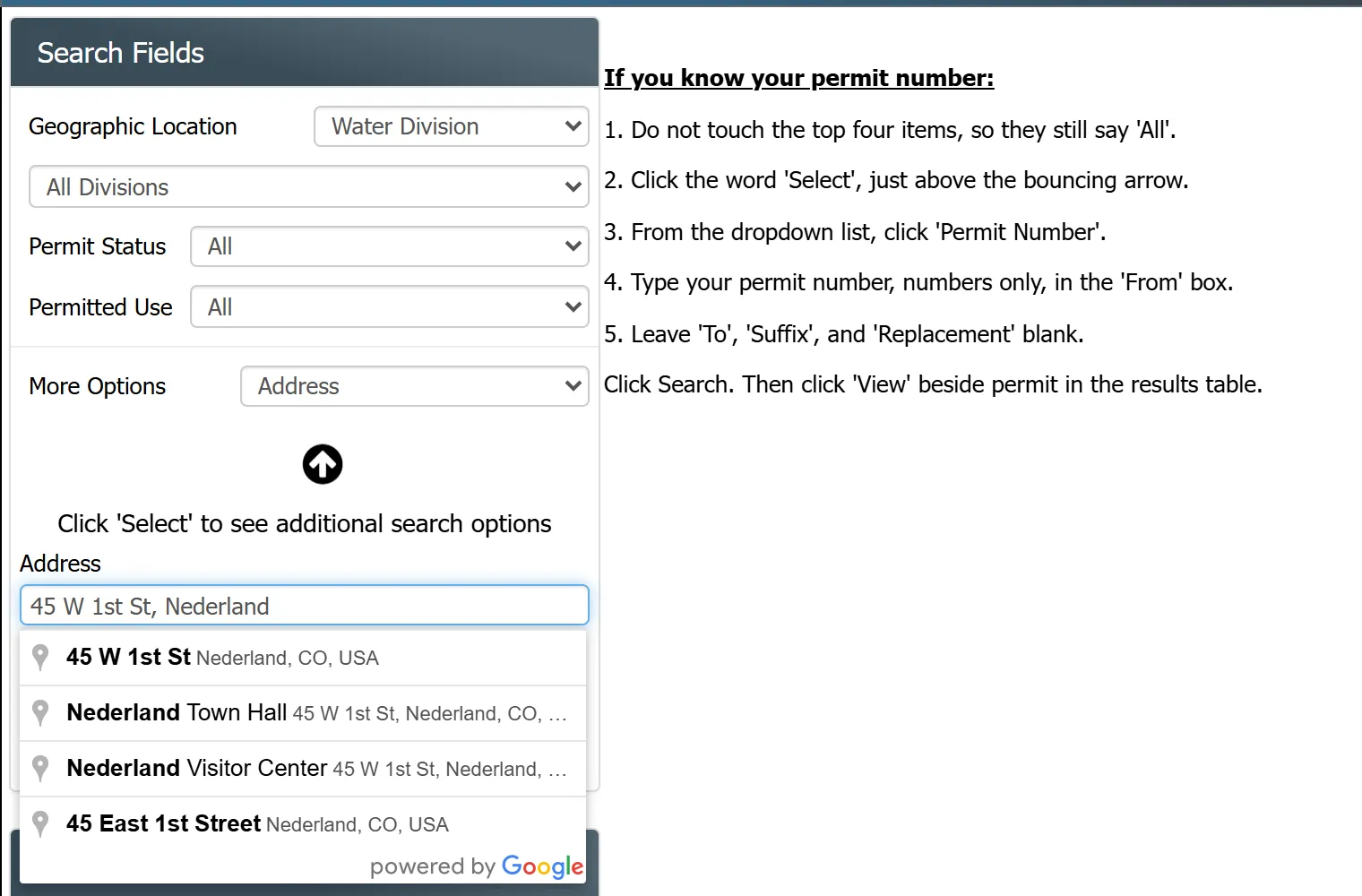
- Open the Well Permits tool. Leave Geographic Location, Permit Status and Permitted Use at their defaults.
- In More Options, choose Address.
- Type the street address, then pick the matching suggestion from the list that drops down. Typed text alone, without a suggestion picked, returns no results.
- Set Within. It starts at 500 feet; switch the unit to miles on a rural parcel, where the well can sit a long way from the house.
- Click Search. Results appear on a map and in a table, and View on any row opens the full record.
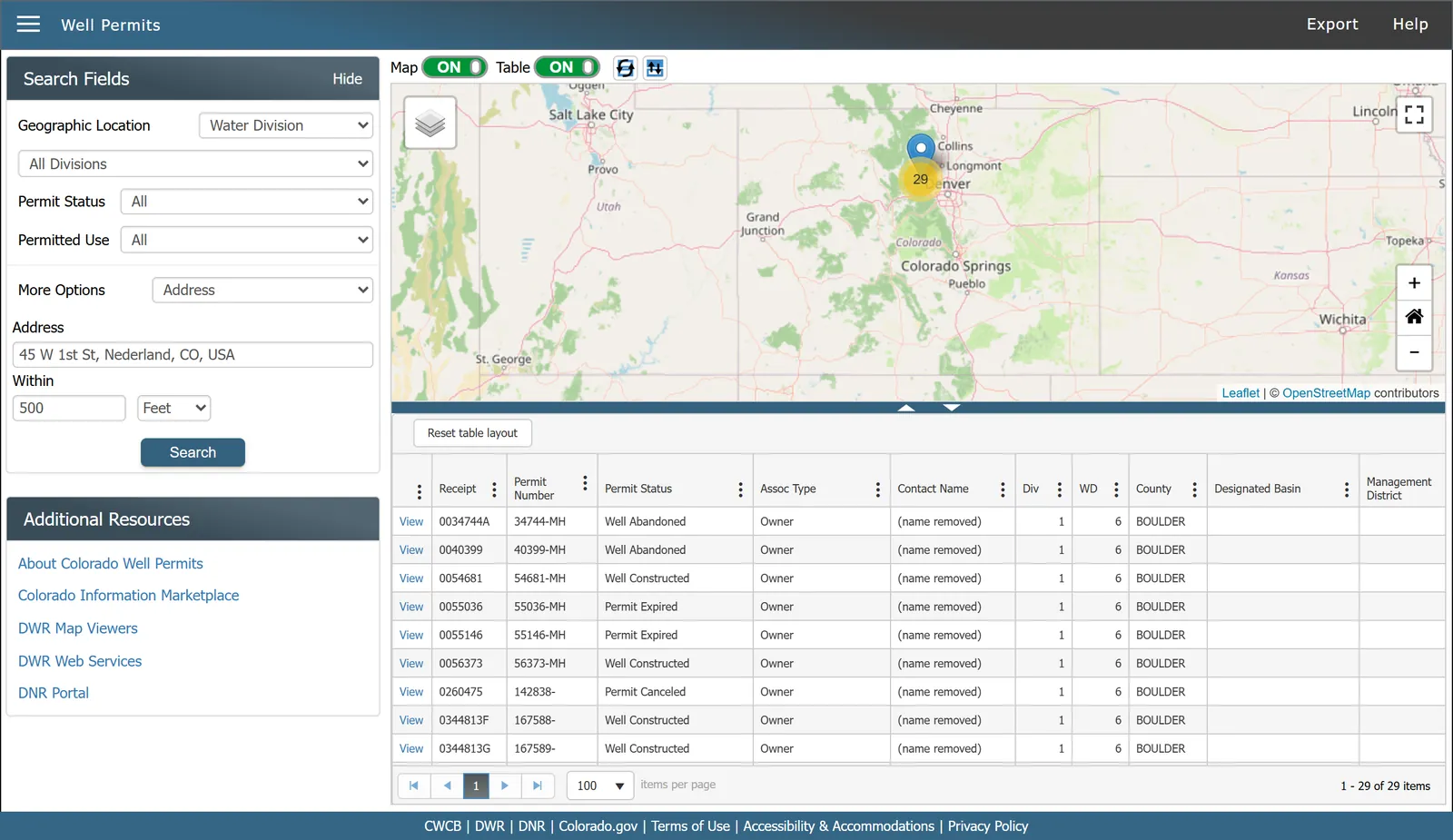
Expect more than one result. A radius catches neighbors' wells, old abandoned ones and replacement permits for the same well, so match the record to the property by its legal description and parcel details before relying on it.
Searching a whole county: set Geographic Location to County, pick the county, and add a status or use filter. A county is a large result, so it works best combined with an address or a legal description.
Find the permit and read it, step by step
1Open the well permit search
Go to DWR's Well Permits tool. No account, no fee. If you would rather work visually, the DWR Well Permit Map Viewer is the same data on a map and is easier when you know where the property is but not its permit number.
2Search by the best identifier you have
In descending order of reliability:
- Permit number — exact, instant, no ambiguity. It is on the permit document and often on the well's tag.
- Legal description — quarter-quarter, quarter, section, township, range and principal meridian. This is how the state actually organizes wells, and it is the most dependable route when you have the property but not the paperwork.
- Location: an address (see search by address above), a county, or the map viewer.
- Owner name (the Applicant option under More Options) works, but is the least reliable: records carry the contact at the time of permitting, which on an older well is frequently someone who sold the place decades ago.
If you do not have the legal description, get it from the county assessor, or read it off the DWR map viewer.
3Read the status field first
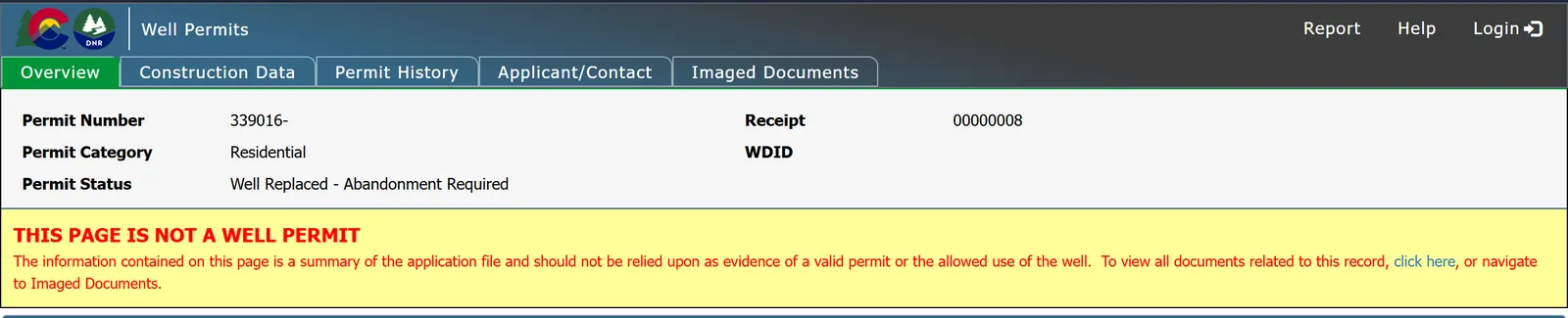
Before anything else, look at the permit's current status. It is the field that tells you whether you are looking at a live authorization or a piece of history, and the vocabulary is unforgiving. Real examples from the records include Application Denied and Well Replaced — Abandonment Required.
A denied application still appears in the database. So does a permit for a well that has been replaced and whose predecessor must be plugged. Neither means the property has a usable well.
Every status DWR uses is decoded in the table below.
4Read the permitted uses — this is the one that matters
The record lists the permitted uses and the permit category. A residential permit showing Domestic use is the common case, and on a parcel under 35 acres it frequently means household use only: drinking, cooking, bathing, laundry. Not the lawn, not the garden, not livestock, not the car.
That limit comes from the statutory presumption that lets small wells be permitted at all C.R.S. § 37-92-602(3)(b)(II)(A), and it is explained in exempt wells and the 35-acre rule. If you are buying a property and intend to irrigate anything, this field is the answer, and it is not negotiable with the seller.
5Check the aquifer and the depth
The record shows the associated aquifers, whether the well is in the Denver Basin, and the total depth. Denver Basin wells are a different legal world — that water is allocated by overlying land ownership rather than by priority, and whether it is nontributary or "not nontributary" changes whether withdrawals need an augmentation plan. See types of water rights.
Depth and the completion record also tell you something practical: an old shallow well in alluvium behaves very differently in a dry year from a deep bedrock well.
6Look at the dates, and mind the gap
Records carry the date the application was received, the date the permit was issued, and the date the well was completed — and they do not always run in the order you expect. It is entirely normal to find a well completed in the nineteenth century with a permit issued last year, because the permit was reissued or the well replaced.
A large gap is not a red flag by itself. An unexplained one is worth asking about.
7Open the full record
Each result links through to its complete permit record, including the construction details and any filed reports. That deep link is the thing to send to your attorney, your lender, or the seller's agent — it is authoritative and it settles arguments.
What your well permit status means
The Permit Status filter in DWR's Well Permits tool lists 30 values (read October 16, 2026). Here is each one, grouped by what it means for someone buying or owning the property. The labels are DWR's, word for word. DWR does not publish a definition for each value, so the readings are ours, and the record's Permit History tab shows the dated actions behind any status.
| Status in the record | What it means for a buyer or owner |
|---|---|
| Application Received Application Information Requested Application Hold Hydrogeology Review Requested Additional Fee Required | Application in progress. No permit has been issued under this receipt yet. The label says what DWR is waiting on. |
| Application Denied Application Withdrawn | Closed without a permit. Nothing was authorized. The record stays in the database, so finding it proves nothing about a well on the ground. |
| Permit Issued Permit Extended | Permitted, not yet built. Construction is authorized but not shown as complete. Outside a designated basin a permit expires two years after issuance unless the well is constructed C.R.S. § 37-90-137(3)(a)(I), and the State Engineer may extend it for good cause § 37-90-137(3)(d). Check the issue date. |
| Permit Expired Permit Canceled Final Permit Canceled | Lapsed. No live authorization under this receipt. A well pumping on a lapsed permit is a question for DWR before closing, not after. |
| Well Constructed Well Deepened Final Permit Final Permit - Well Deepened | Built and on record. The record shows a constructed well. This is the status you hope to see, and the permitted uses field now decides what the water may be used for. The Final Permit labels are a separate stage in DWR's list; the Permit History tab shows the dated actions behind them. |
| Well Constructed - Replacement Permit Issued Final Permit - Replacement Permit Issued Well Replaced - Abandonment Required Final Permit - Well Replaced, Abandonment Required Final Permit - Well Replaced | Replaced. This receipt describes a well that has been replaced, or is being. The status says a replacement permit was issued, so find the record for that replacement permit and check its status. Where the label says abandonment required, the old well still has to be plugged: look for a Well Plugged and Abandoned action in its Permit History. |
| Well Abandoned Dry Hole Constructed Dry Hole Abandoned | No usable well. There is no producing well under this receipt. A dry hole is a well that was drilled without producing water. |
| Pump Installed in Well Without a Permit Pump Installed, No Construction Info Received Post Construction Review Requested Permit Expired (Pump Installed) | Paperwork gap. The record shows something unfinished: a pump without a permit, a pump without a construction report, a permit that expired with a pump in place, or a DWR review still open. Each is a question for DWR's well permitting staff before money changes hands. |
| See Associated Receipts NA | Look elsewhere. The status is not on this record. Open the associated receipts listed on the full record, or ask DWR. |
Reading the location fields
Colorado wells are located by the Public Land Survey System, and the records show it in pieces: principal meridian, township, range, section, and then the quarter and quarter-quarter. Read it inside out — a well listed in the SE quarter-quarter of the NW quarter of section 21 sits in a 40-acre block within a 160-acre block within a square mile.
The records also carry latitude, longitude and a location accuracy note. Accuracy varies: some points were surveyed, others were "spotted from quarters," meaning someone placed the well at the center of its quarter-quarter. Do not use a plotted point to decide a setback or a property line.
If you cannot find a permit
- Widen the search. Try the section rather than the address, and check adjacent sections — legal descriptions get transcribed wrong.
- Try the map viewer, which finds wells you cannot name.
- Consider that there may not be one. Wells drilled before permitting, or drilled without a permit, exist. That is a material problem for a buyer and a conversation to have with an attorney rather than the seller.
- Ask DWR. The well permitting staff answer questions about their own records. DWR well permitting
That completes the three lookup tutorials. Back to the lookup hub for which database answers which question, or to checking a property to put all three together on a parcel you are actually considering.
Common questions
How do I find my well permit in Colorado?
Search DWR's well permit records by permit number if you have it, or by legal description — quarter-quarter, quarter, section, township, range and principal meridian — which is how the state organizes wells. County and address searches and the DWR Well Permit Map Viewer also work. The records are free and require no account.
How many well permits are there in Colorado?
DWR's well permit records held roughly 650,000 entries statewide when checked on October 16, 2026, including 347,256 in Division 1, the South Platte basin. That count covers every permit ever issued, of every type, rather than the number of wells currently in use.
What does my well permit allow me to do?
Only what the permitted uses field says. A residential permit for domestic use on a parcel under 35 acres commonly authorizes indoor household use only and excludes irrigation of any kind. Larger parcels may carry the full exempt-well uses, including livestock and up to one acre of lawn and garden.
What does "Well Replaced - Abandonment Required" mean?
It is a permit status indicating the well has been replaced and the original must be properly plugged and abandoned. It appears in the records like any other status, so a search result carrying it does not indicate a usable well — always read the status field before drawing conclusions.
How do I look up a well permit by address in Colorado?
Open DWR's Well Permits tool, choose Address under More Options, type the address and pick the matching suggestion from the list, set a search radius, and click Search. The results include every permit within that distance, so confirm the right one by its legal description.
What does my well permit status mean?
It says where the permit stands: an application, a permit not yet built on, a constructed well, a replaced or abandoned well, or a record with a paperwork gap. A constructed well is the status a buyer hopes to see, but DWR's own notice says the record summary should not be relied on as evidence of a valid permit, and the permitted uses still limit what the water may be used for. The decoder table on this page covers all 30 statuses in DWR's tool.
Can I search Colorado well permits by owner name?
Yes, but it is the least reliable method. Records carry the contact at the time of permitting, so an older well frequently lists a previous owner. Permit number and legal description give dependable results.